
Retrica Android 9.0 is now available — and this update brings some of the most meaningful changes we’ve shipped in a while.
From the way you browse presets to the way you discover new content, version 9.0 touches nearly every part of the app. If you’ve been waiting for Retrica to feel more fluid, more personal, and more connected to your creative process, this is the update you’ve been waiting for.
Here’s everything that’s new.
1. Browse Presets Live on Your Camera Screen
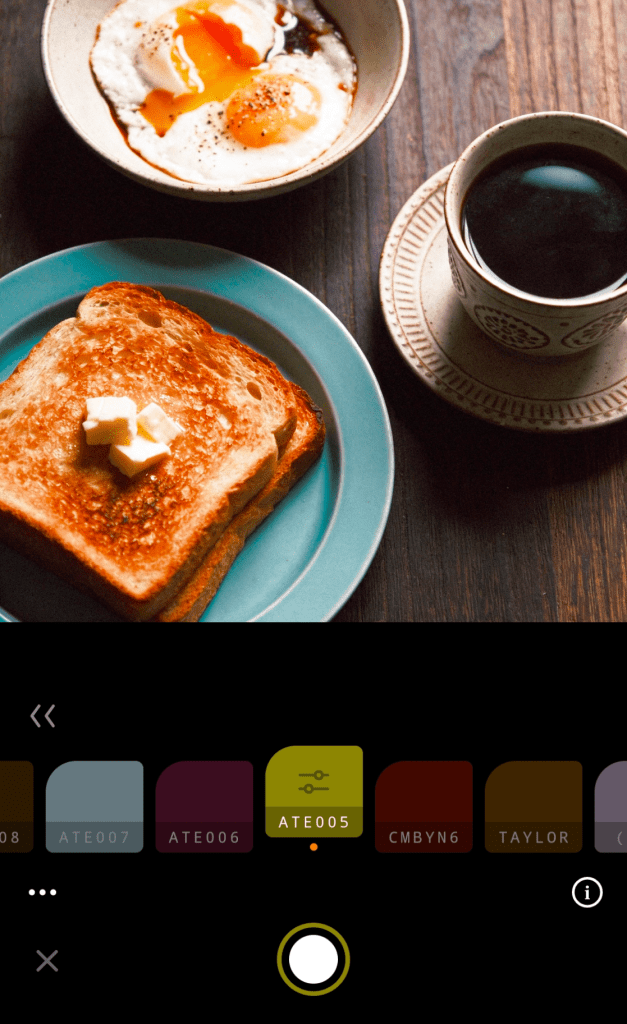
The biggest change in Retrica 9.0? Presets are back where they belong — on the camera.
In earlier versions of Retrica, exploring presets meant leaving the camera view entirely. You’d navigate to the Preset Discover page, scroll through options, and try to mentally picture how each one would look on your actual shot. Then come back and shoot. It worked — but it wasn’t ideal.
Retrica 9.0 brings back live preset browsing on the camera preview screen, just like the classic Retrica experience that so many of you loved.
Now you can swipe through presets in real time, with your subject in frame, in your actual lighting conditions, at the exact moment you’re about to shoot. You see the result before you press the shutter. You pick the preset that’s right for that shot — not just a preset that looked good on a thumbnail.
The difference is real: shooting with live previews feels faster, more intuitive, and just more fun. The right preset for the right moment, every time.
For photographers who shoot on the go: this change alone makes the whole shooting flow noticeably smoother. No interruptions. No guesswork. Just shoot.
2. The New Discover Tab — Retrica’s Official Content Hub
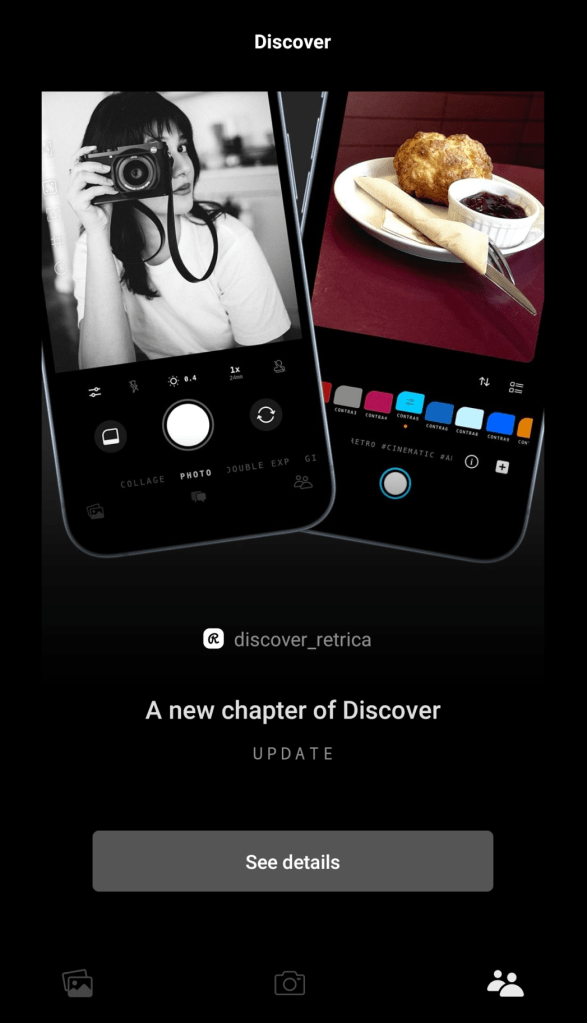
The Inspiration tab has been replaced with something better: the Discover tab.
The previous Inspiration tab was centered around community photos — a space to browse what other users were creating. With Retrica 9.0, that tab has evolved into a dedicated content destination where Retrica speaks directly to you.
The new Discover tab is home to official Retrica posts, including:
- Photography tips — practical guidance to help you shoot better photos with any subject or setting
- Preset guides — deep dives into specific presets, how they work, and when to use them
- New preset announcements — be among the first to know when fresh presets drop
- Seasonal photo ideas — inspiration tied to the time of year, trending aesthetics, and cultural moments
- App update news — the latest Retrica news, straight from the source
Think of it as Retrica’s editorial feed. Whether you’re looking to sharpen your skills, find your next favorite preset, or just get inspired before a shoot, the Discover tab has something for you.
Check in regularly — new content will be added consistently.
3. In-App Feedback — Talk to Retrica Directly
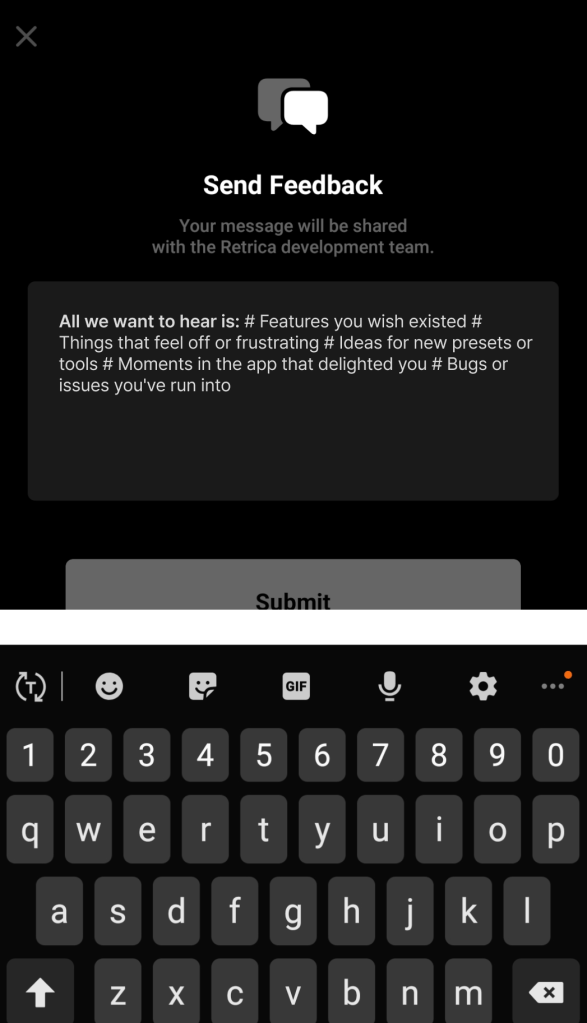
For the first time, you can send feedback to Retrica without ever leaving the app.
Throughout the app, you’ll notice small, friendly speech bubble icons. Tap one, and a message window opens up immediately. No support tickets. No email threads. Just a direct line from you to the Retrica team.
We want to hear everything:
- Features you wish existed
- Things that feel off or frustrating
- Ideas for new presets or tools
- Moments in the app that delighted you
- Bugs or issues you’ve run into
Every message reaches us. And every message has the potential to shape what comes next for Retrica. This feature exists because we believe the people who use Retrica every day know things we don’t — and we want to close that gap.
If there’s something on your mind, now’s the time to say it.
4. Improved Onboarding — Build Your Preset Packs From Day One
Starting fresh with Retrica 9.0? Your preset packs are ready to be built.
The onboarding experience has been redesigned so that new users — and returning users re-engaging with the app — can build custom preset packs from the very beginning of their Retrica journey.
A preset pack is a curated collection of filters you love, organized in one place and accessible directly from the main camera screen. Instead of searching every time, your go-to presets are always right there.
Now, during onboarding, you’re guided through the process of creating packs that match your style from the start. Whether you want a pack for portraits, a pack for golden hour shots, or a pack for moody black-and-white work — you build it your way, and Retrica puts it exactly where you need it.
Your presets, organized around you, from the moment you open the app.
5. Preset Crush — Retrica Learns What You Love
The more you use Retrica, the more it understands your taste. That’s Preset Crush.
Preset Crush is a smart feature that pays attention to which presets you reach for most — your signature filters, the ones you use on nearly every shoot, the ones that define your aesthetic. Based on your usage, Retrica helps you organize those presets into packs so they’re always fast and easy to access.
It’s designed for photographers who develop a strong visual identity over time. Instead of having to manually rediscover your favorites or reorganize your preset library from scratch, Preset Crush does that work for you.
Use it to:
- Build a “signature” preset pack around your most-used filters
- Create multiple packs for different shooting contexts or creative projects
- Keep your creative workflow fast and consistent, no matter what you’re shooting
The feature grows with you. The more you shoot, the more accurate it becomes — and the more useful it gets.
What’s Next
Retrica 9.0 for Android is available now on the Google Play Store.
Update the app and start with the camera screen — swipe through presets on your live preview and feel the difference. Then head to the Discover tab to see what’s waiting for you there. And when you’re ready, tap a speech bubble and let us know what you think.
Every version of Retrica gets better because of the people who use it. That’s not a line — it’s how we actually work.
Update to Retrica 9.0 and make it yours. 📸
Frequently Asked Questions
Q: What’s new in Retrica Android 9.0? Retrica 9.0 introduces live preset browsing on the camera screen, a redesigned Discover tab with official Retrica content, in-app user feedback, an improved onboarding flow with custom preset packs, and Preset Crush — a feature that learns and organizes your most-used presets.
Q: Can I browse presets while using the camera in Retrica 9.0? Yes. In Retrica 9.0, you can swipe through presets directly on the live camera preview screen, so you see exactly how each filter looks before you shoot.
Q: What is the Discover tab in Retrica? The Discover tab replaces the old Inspiration tab. It’s a content hub where Retrica publishes photography tips, preset guides, seasonal inspiration, new preset announcements, and app update news.
Q: What is Preset Crush in Retrica? Preset Crush is a feature that tracks your most-used presets and helps you organize them into easy-to-access packs — so your favorite filters are always within reach, and your shooting workflow stays fast.
Q: How do I send feedback to Retrica through the app? In Retrica 9.0, small speech bubble icons appear throughout the app. Tap one to open a message window and send your feedback, ideas, or bug reports directly to the Retrica team.
Q: Is Retrica 9.0 available on Android? Yes, Retrica 9.0 is now available on Android via the Google Play Store.
 Retrica
Leave a comment